



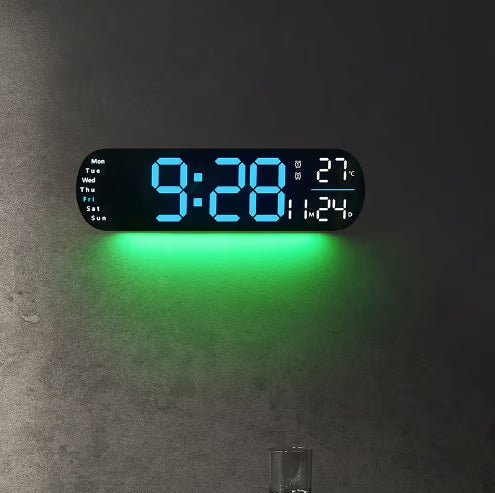
A closer look
16.2-Inch LED Digital Wall Clock
Make the time easy to read with a large LED display. A practical option for a home office, living room or shared workspace.
- Huge 16.2″ LED screen — 4″ jumbo digits, viewable from across the room, even at odd angles.
- Multi-Info Display — time, date, weekday, and ambient temperature all on one clean screen.
- Remote & Auto-Dimmer — adjust brightness manually (10 levels) or let it auto-adjust to room lighting. :contentReference[oaicite:1]{index=1}
- Memory Function — retains time settings during brief power interruptions. :contentReference[oaicite:2]{index=2}
2025 Upgraded 16.2″ LED Digital Wall Clock

Massive 16.2″ display with 4″ jumbo digits — time, date, weekday & temperature all visible at a glance. Remote control, auto-dimming brightness, memory retention: ready for any room, anywhere.
- Huge 16.2″ LED screen — 4″ jumbo digits, viewable from across the room, even at odd angles.
- Multi-Info Display — time, date, weekday, and ambient temperature all on one clean screen.
- Remote & Auto-Dimmer — adjust brightness manually (10 levels) or let it auto-adjust to room lighting. :contentReference[oaicite:1]{index=1}
- Memory Function — retains time settings during brief power interruptions. :contentReference[oaicite:2]{index=2}
- Count-Up/Count-Down Timer — built-in timer up to 99 minutes 99 seconds for workouts, cooking, or work cycles. :contentReference[oaicite:3]{index=3}
- Plug-In Powered — operates on USB (5V/1A or 5V/2A). Battery used only for memory backup. :contentReference[oaicite:4]{index=4}
Specifications
| Display Size | 16.2″ LED with 4″ tall digits |
| Display Info | Time, Date, Weekday, Temperature |
| Brightness | 10 adjustable levels + auto-dimming |
| Timer | Count-up/down (up to 99:99) |
| Power Source | USB cable (5V/1A or 5V/2A adapter required) |
| Memory Backup | Yes (battery backup for time retention) |
| Control | Remote control included |
What’s in the Box
- 1 × 16.2″ LED Digital Wall Clock
- 1 × USB power cable
- 1 × Remote control
- User manual
How to Use & Care
- Mount securely on wall using included screws or place on tabletop stand (if applicable).
- Plug into a 5V/1A or 5V/2A USB adapter — clock will power on immediately.
- Use remote to set time, date, brightness, and timer features.
- In case of power outage, the clock resumes with saved settings.
- Wipe display gently with soft cloth; avoid abrasive chemicals.
Need a clock that's easy to read from anywhere?
Add this 16.2″ LED clock to your cart — effortless visibility, full functionality, zero hassle.
Display brightness may vary slightly depending on environmental light. Remote and USB adapter not visible in some product shots.

